Magnet controllers
The Magnet Control panel sets field or current, controls ramps and displays readback from a shared magnet-controller engine. Open it from Engines > Magnet or its toolbar button. See Controllers for the common engine, panel and status-bar connection workflow.
Connection and rig settings
On Connection, choose the driver, transport and instrument address, then connect. Save Settings to YAML preserves the rig’s connection settings. The status-bar Magnet indicator can subsequently connect using those saved settings without opening the panel.
Configuration contains the magnet constant, limits, compliance, ramp and stability settings supported by the selected driver, alongside live controls. Check the magnet constant and field/current conversion for the actual magnet before applying a target. Field, current, ramp and persistent-switch options depend on the driver and connected power supply.
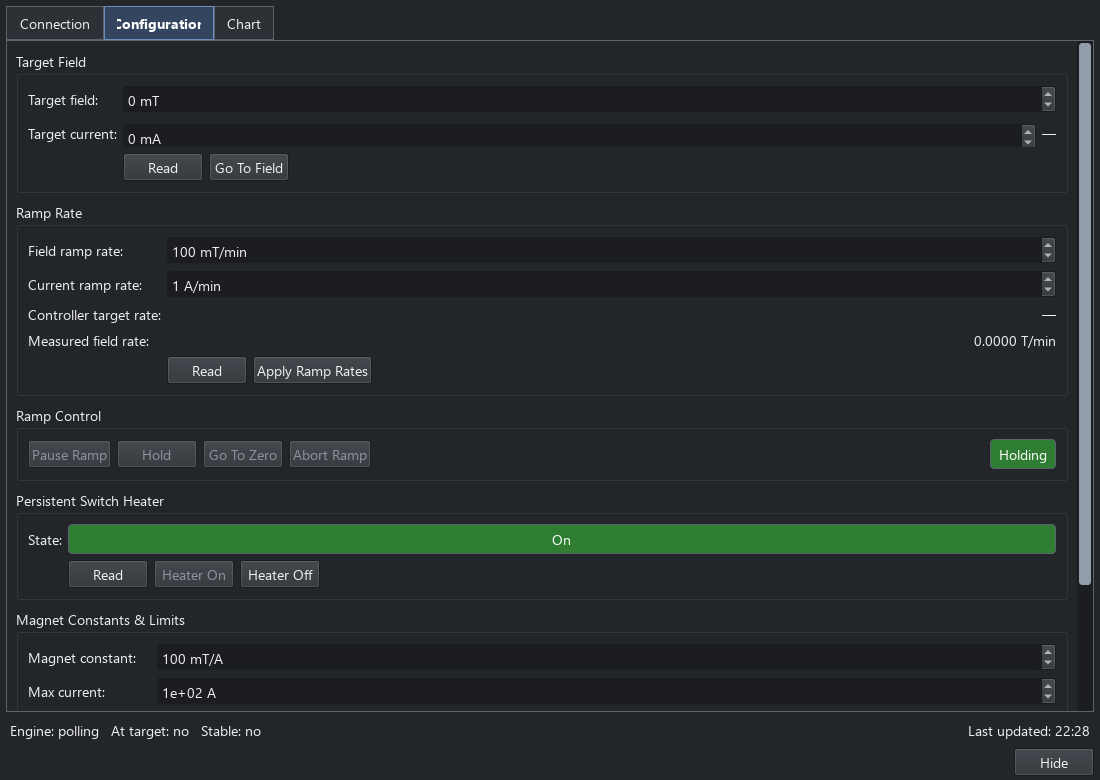
Configuration and live controls with the simulated magnet. These values illustrate the interface and are not settings for a physical magnet.
Manual control and monitoring
Use the field/current target and ramp controls to change the state, and the readback/status area to follow it. Persistent-switch controls are available only when the driver supports them. Chart shows the controller’s live history; closing or hiding the panel leaves the shared engine connected. Use Disconnect on the connection page or the main-window status indicator when you intend to end the session.
Sequences and results
Set Field, Magnet Controller Scan, Magnet Controller Sweep and Magnetic Field Monitor borrow the same controller service. Use a scan to measure after discrete targets; use a sweep to sample while the field changes. Configure the step’s data collection and plotting as shown in Collecting, fitting and saving data. The panel’s chart does not itself create a saved measurement table.
For scripted control, use the shared controller service described in Console and script reference and its signatures in Core modules. Plugin authors must preserve borrowed-session ownership; see Writing sequence plugins.
